
Download Pixel Art AI – AI‑powered pixel art creator, free trial, secure download
Overview
Pixel Art AI is a subscription‑based web application that brings artificial intelligence to the world of retro‑style graphics. Designed for game developers, graphic designers, and hobbyist pixel artists, the platform lets you transform any concept—be it a “cosmic turtle” or a “winter village scene”—into crisp, pixel‑perfect artwork in seconds. The core promise of Pixel Art AI is simplicity without sacrificing creative depth: users can generate complete sprites, background tiles, or animated loops by typing a natural‑language prompt, then refine the output with a built‑in pixel studio that offers layers, brushes, and copy/paste tools.
Because the service runs entirely in the browser, there’s no need for heavyweight installations or powerful local GPUs; the heavy lifting is done on secure cloud servers, guaranteeing fast render times and consistent performance across devices. The application also respects privacy—each canvas can be kept private or shared via a secure link, and all exports are downloadable as PNG files without watermarks. Whether you’re prototyping a new indie game, creating icons for a mobile app, or just experimenting with pixel aesthetics, Pixel Art AI provides a modern, AI‑enhanced workflow that speeds up production while keeping the artistic control firmly in your hands.
In addition to speed, the platform offers a collaborative environment where teams can share links, comment on drafts, and iterate together in real time, making it a practical choice for remote studios and solo creators alike. The combination of AI generation, a full‑featured editor, and cloud‑based storage creates a seamless pipeline from idea to finished asset, reducing the typical bottlenecks associated with hand‑drawing pixel art from scratch.
Features & Tools
- AI Prompt‑Based Generation: Type a description and watch the AI create a pixel artwork in your chosen style, from 8‑bit nostalgia to modern neon.
- Built‑In Pixel Studio: Full‑featured editor with layers, custom brushes, eraser, color picker, and clipboard functions.
- AI Inpainting & Editing: Highlight any region and give a new prompt to replace or enhance that part without redrawing from scratch.
- Multi‑Canvas Management: Open, organize, and switch between several projects within a single session.
- Export as PNG: Download your creations in lossless PNG format, ready for game engines, web use, or further editing.
- Style Library: Choose from pre‑defined artistic styles—retro arcade, cyber‑punk, fantasy, and more—to guide the AI.
- Privacy Controls: Keep canvases private, share via secure links, or publish to the community gallery.
- Cross‑Platform Accessibility: Run the app on any modern browser, making it usable on Windows, macOS, Linux, Android, and iOS devices.
- Regular Updates: Monthly model improvements, new brush packs, and expanded style collections delivered automatically.
- Subscription Flexibility: Monthly or annual plans, plus a 7‑day free trial to test all premium features.
The combination of AI generation and a traditional pixel editor is what sets Pixel Art AI apart from generic drawing tools. While the AI handles the heavy creative lift—interpreting vague ideas into concrete pixel patterns—the studio lets you fine‑tune colors, adjust sprite dimensions, and animate frames with pixel‑level precision. The inpainting feature is particularly powerful for iterative design: need to change the color of a character’s hat?
Simply select the hat area, type “red wizard hat”, and let the AI redraw that segment while preserving the surrounding pixels. This workflow dramatically reduces the time spent on repetitive tasks such as redrawing sprites for each animation state, allowing creators to focus on storytelling and gameplay mechanics. Moreover, the style library acts as a creative shortcut, offering preset palettes and pixel densities that match classic consoles or modern indie aesthetics.
Users can also create custom brush sets, import their own palettes, and save them for future projects, ensuring consistency across a game’s visual language. The multi‑canvas management system makes it easy to juggle character sheets, background tiles, and UI elements within a single workspace, while the cloud‑based storage automatically saves progress, eliminating the fear of lost work. Overall, these features blend into a cohesive ecosystem that supports both rapid prototyping and detailed polish, making Pixel Art AI a versatile tool for creators at any skill level.
Getting Started – Installation, Usage & Compatibility
Step‑by‑Step Installation
Because Pixel Art AI is a web‑based service, there is no traditional installation process. To begin, navigate to pixel-art.ai using any up‑to‑date browser (Chrome, Firefox, Edge, Safari). Click the “Start Free Trial” button, create an account with your email or social login, and verify your address.
Once logged in, you’ll be directed to the dashboard where the AI canvas awaits. If you prefer a desktop shortcut, most browsers allow you to “Install” the web app as a Progressive Web App (PWA), giving you an icon on your desktop or start menu that opens the tool in a dedicated window. The PWA installation process is straightforward: on Chrome, click the three‑dot menu → “Install Pixel Art AI”; on Edge, select “Apps” → “Install this site as an app”.
After installation, the app behaves like a native program, launching faster and keeping a persistent session, but it still relies on the same cloud backend for AI rendering.
Using the Platform
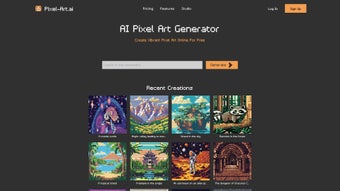
After accessing the dashboard, you’ll see a large input field labeled “Describe your pixel art”. Type a concise prompt—e.g., “A 32×32 pixel dragon breathing fire in a medieval castle”—and hit “Generate”. The AI processes the request on secure cloud servers and returns a rendered sprite within seconds.
You can then click “Edit” to launch the built‑in pixel studio, where you can add layers, adjust the palette, or use the inpainting tool for targeted changes. The toolbar is organized intuitively: the left side hosts brush and eraser options, the right side shows layer controls, and the bottom bar displays zoom and canvas size settings. Keyboard shortcuts (B for brush, E for eraser, L for layer panel) speed up the workflow, and a history panel lets you undo/redo up to 100 actions.
When you’re satisfied, click “Export” to download the PNG file or share a private link with collaborators. For larger projects, the “Batch Export” feature allows you to download multiple canvases as a zip archive, streamlining asset management for game engines like Unity or Godot.
Compatibility Details
Pixel Art AI works on any device that supports modern HTML5 and WebGL standards. Officially supported operating systems include:
- Windows 10 and later (Chrome, Edge, Firefox)
- macOS 10.15 Catalina and later (Safari, Chrome, Firefox)
- Linux distributions with recent browsers (Chrome, Firefox)
- Android 8.0 Oreo and later (Chrome, Firefox mobile)
- iOS 13 and later (Safari, Chrome)
Because the heavy AI computation occurs in the cloud, performance is more dependent on internet speed than local hardware. A stable broadband connection (minimum 5 Mbps download/upload) is recommended for optimal responsiveness, especially when working with large canvases or multiple layers. Mobile users benefit from the touch‑optimized interface, which offers larger on‑screen buttons and pinch‑to‑zoom gestures. Desktop users can take advantage of larger screen real estate and external graphics tablets for finer control. In low‑bandwidth scenarios, the platform automatically reduces rendering resolution to keep the experience fluid, but the final export always matches the selected canvas size.
Pros, Cons & User Experience
Pros
- Rapid Concept-to‑Art Workflow: Generate high‑quality pixel sprites in seconds.
- Intuitive Editor: Familiar pixel‑art tools combined with AI enhancements.
- Cross‑Platform Access: No OS lock‑in; works on desktop and mobile browsers.
- Privacy Controls: Private canvases and secure sharing links.
- Regular Feature Updates: New styles, brushes, and AI model improvements.
- Free Trial: Test all premium features before committing to a subscription.
- Collaborative Links: Real‑time editing with teammates via shareable URLs.
- Cloud‑Backed Autosave: No risk of losing work due to power loss or crashes.
Cons
- Subscription Cost: Ongoing monthly or annual fees may be a barrier for casual hobbyists.
- Internet Dependency: Requires a stable connection; offline work is not possible.
- Learning Curve for Prompts: Getting the AI to produce exact results can need iterative prompting.
- Limited Export Formats: Only PNG is supported; no SVG or GIF exports directly.
- Performance Variability: Large canvases may experience slight latency during AI rendering.
- No Built‑In Animation Export: Users must manually assemble frames into GIFs or sprite sheets.
Overall, user feedback highlights that Pixel Art AI dramatically speeds up the early stages of sprite creation, especially for small teams and solo developers who lack a dedicated pixel artist. The combination of AI generation and a full‑featured editor means you can go from concept to finished asset without switching between multiple programs. While the subscription price is higher than some free pixel editors, the time saved and the quality of AI‑generated art often justify the expense for professionals. Users who need offline capability or multi‑format export may need to complement Pixel Art AI with a traditional raster editor, but for the majority of pixel‑art workflows the platform delivers a compelling, all‑in‑one solution. The community gallery also serves as a source of inspiration, showing how other creators interpret similar prompts and providing a benchmark for style consistency across projects.
FAQ & Final Verdict
Can I use Pixel Art AI for commercial projects?
Yes. All assets generated under a paid subscription are cleared for commercial use, allowing you to incorporate them into games, apps, or marketing material without additional royalties.
Is there a free version or only a trial?
Pixel Art AI offers a 7‑day free trial that unlocks all premium features. After the trial, you must choose a monthly or annual subscription; there is no permanently free tier.
How does the AI inpainting work?
Select the area you want to modify, type a new prompt (e.g., “add a red cape”), and the AI regenerates only that region while preserving surrounding pixels, making precise edits fast and seamless.
Can I collaborate with teammates on the same canvas?
Yes. You can generate a shareable link with edit permissions, allowing multiple users to work on the same project simultaneously, similar to cloud‑based design tools.
What browsers are officially supported?
Pixel Art AI runs on the latest versions of Chrome, Firefox, Edge, and Safari. Mobile browsers on Android and iOS are also supported, provided they support WebGL and modern JavaScript standards.
Conclusion
Pixel Art AI bridges the gap between creative imagination and pixel‑perfect execution. By harnessing AI for rapid generation and coupling it with a robust, browser‑based pixel studio, the platform empowers both seasoned developers and newcomers to produce high‑quality sprites without the steep learning curve of traditional tools. If you’re looking for a secure, continuously updated solution that works across Windows, macOS, Linux, Android, and iOS, the subscription model is a worthwhile investment—especially when you factor in the time saved during prototyping and asset iteration. Ready to turn your ideas into vibrant pixel art? Start your free trial today and experience the future of pixel creation.
Overall Rating: 4.5/5
Pros: rapid AI‑driven generation, full‑featured editor, cross‑platform access, secure cloud storage, regular updates, collaborative links, extensive style library.
Cons: subscription cost, internet‑only usage, learning curve for prompt engineering, PNG‑only export, occasional latency on large canvases.



.png)



